Yavaa
Supporting Data Workflows
from Discovery to Visualization
Sirko Schindler
From Alpha to Omega (Static Visualization)
Dataset Search

- Myriads of providers
- Heterogeneity everywhere
- Metadata search only
- Limited support of primary data search (if at all)
Dataset Combination
- Common search returns individual datasets
- Complete answers might need multiple datasets, though
- Heterogeneity in vocabularies
- Heterogeneity in granularity
Dataset Modification

- Data barely in the required shape
- Suitable operations?
- Consistency across operations
- Units of measurement easily overlooked
Visualization

- Plethora of visualizations available
- Technically possible? Suitable?
- Map Data to Visualization
- Which data to which visual artifact?
Publication

- Provenance
- Inputs? Operations?
- Accessibility

- (Updates, Changes, &) Re-execution
Thesis Outline
Interlude: OLAP-Cubes
Columns / Variables / ...
OLAP-Cube
Requirements to Metadata Schema

General Information
- Title
- Description
- Author / Publisher
- …
Loading Data
- Download location(s)
- Media type
- Inner structure
Primary Data Search
- Column concepts
- Data ranges
- Semantic relationships
Data Integration
- Codelists
- Units of measurement
- Roles of Variables
Metadata Schema
Metadata Usecase - Search
Semantic Search
- Supporting the -nyms
- Hypernyms, hyponyms, synonyms, …
- Disambiguating homonyms
- Multilinguality
- …
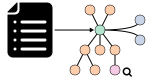
Primary Data Search
- Values in context
- Mediate between encoding schemes
- Execute complex queries on metadata
- No fetching of (much larger) primary data
- Combine criteria
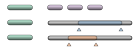
Primary Data Search across Sources

- Multiple datasets to fulfill a query
- Search → Search & Integration
- Identify candidate datasets
- Select subset to cover query
- Harmonize data
- Combine datasets
- Change in search results
- List of datasets → Integration Workflow
- User-adjustable
- Workflow executed upon user request
Query Structure
- Keyword search → query by example
- Description of requested structure
- Column headers and possibly value ranges
- Value ranges
- Categorical: enumeration of values
- Time & quantitative: lower and/or upper bound
- Extent of value ranges
- Finite / bounded: range given
- Infinite / unbounded: no range given
- Semi-finite / semi-bounded: only lower or upper bound
(for time and quantitative columns)
Rephrasing the Task
A jigsaw puzzle in higher dimensions
Dataset Combination
- Search for candidates
- Select best candidate
- Split regions
- Apply Steps 2&3 recursively
- Assemble workflow
- Get user input
- Search metadata repository
- Criteria
- ≥ 1 matching dimension
- ≥ 1 matching measurement
Dataset Combination
- Search for candidates
- Select best candidate
- Split regions
- Apply Steps 2&3 recursively
- Assemble workflow
- Get user input
- Order candidates wrt. query
- Criteria
- Coverage … overlap in values between dataset and query
- Support … common columns between dataset and query
- Excess … additional dimensions in dataset wrt. the query
$$ \text{Score}(~s,~q~)~= \begin{pmatrix} ~\text{Coverage}(~s,~q~)~\times~\text{Support}(~s,~q~)~\\ ~1-~\text{Excess}(~s,~q~)~ \end{pmatrix} $$
Dataset Combination
- Search for candidates
- Select best candidate
- Split regions
- Apply Steps 2&3 recursively
- Assemble workflow
- Get user input
- Split query into regions
- Already covered
- So far uncovered
- Maintain "rectangular" shape
- Using conflict-avoiding strategy
Dataset Combination
- Search for candidates
- Select best candidate
- Split regions
- Apply Steps 2&3 recursively
- Assemble workflow
- Get user input
- Reuse candidate list from before
- Drop candidates with a score of zero
- No new query to the metadata repository needed
- Terminate recursion if …
- Entire (remaining) query is covered
- No more candidates are left over
Dataset Combination
- Search for candidates
- Select best candidate
- Split regions
- Apply Steps 2&3 recursively
- Assemble workflow
- Get user input
- Adjust dataset schemata
- Additional measurements → drop columns
- Additional dimensions → user interaction
- Combine partial solutions
- Union- / join-operators
Dataset Combination
- Search for candidates
- Select best candidate
- Split regions
- Apply Steps 2&3 recursively
- Assemble workflow
- Get user input
- Present result to user
- Coverage wrt. query
- Included data providers
- Included datasets
- Select aggregations functions if necessary
- Refine search?
Dataset Combination - Summary
Evaluation

Evaluation - Setup
Many thanks to Maximilian Stiede for the help here!
Evaluation - Scenario
Your task is to create a dataset that holds the amount of sheep per inhabitant for the following European countries (the shortlist of vacation destinations of your superior - purely coincidental, of course) and period of time (previous five years):
- Countries: Germany, Iceland, Ireland, Romania, Spain
- Period of time: 2014 - 2019
After the dataset has been assembled, choose an adequate graph to present your results to your fellow colleagues and the general public. The suggested order of steps is as follows. Your personal workflow might deviate, though.
- Identify suitable datasets.
While in general Eurostat has all the data you need, it is not provided as a single dataset to start with, so you will need to combine multiple ones. - Prepare a single dataset.
Eurostat's datasets contain more data than needed, so you will have to filter for the requested values. You may also need to join multiple source datasets. - Calculate the desired metric.
The requested metric is not included in Eurostat's raw data, so you will have to calculate it manually. - Select a proper visualization.
Once the dataset contains only the requested values, you can choose a suitable visualization. - Export your results.
Store your results (data and visualization) locally and then upload them on the next page.
Evaluation - Anticipated Strategies

User Evaluation - Setup
- Within-subject design with counterbalancing
- Eurostat + Spreadsheet software
(LibreOffice Calc, Microsoft Excel) - Yavaa
- Eurostat + Spreadsheet software
- Tutorials provided for all tools
- Conducted fully remote and unsupervised
in Q1 / Q2 2019 - Submissions
- 92 total
- 16 complete
Self-assessment: Prior experience.
![]()
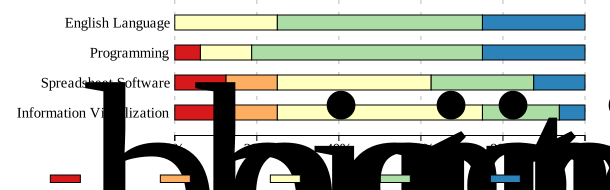
User Evaluation I - Successful Task Execution
- Manual assessment of submitted artifacts
- Classes of Issues
- High-severity
- unsuitable for the task.
Example(s): incorrect joins, missing data. - Moderate-severity
- suitable, but violating some constraints.
Example(s): additional data included, no unit conversion. - Low-severity
- cosmetic issues.
Example(s): countries referred to by abbreviation.
Issues per submission: Summary.
![]()

User Evaluation II - Time Taken

User Evaluation III - Usability
User assessment.
![]()

J. Brooke. SUS: a "quick and dirty" usability scale. In: Usability Evaluation in Industry. London: Taylor and Francis, 1996.
J. Brooke. SUS: A Retrospective. In: J. Usability Studies 8.2 (Feb. 2013), pp. 29–40.
A. Bangor, P. T. Kortum, and J. T. Miller. An Empirical Evaluation of the System Usability Scale. In: International Journal of Human-Computer Interaction 24.6 (July 2008), pp. 574–594. DOI: 10.1080/10447310802205776.
A. Bangor, P. Kortum, and J. Miller. Determining What Individual SUS Scores Mean: Adding an Adjective Rating Scale. In: J. Usability Studies 4.3 (May 2009), pp. 114–123.
J. Brooke. SUS: A Retrospective. In: J. Usability Studies 8.2 (Feb. 2013), pp. 29–40.
A. Bangor, P. T. Kortum, and J. T. Miller. An Empirical Evaluation of the System Usability Scale. In: International Journal of Human-Computer Interaction 24.6 (July 2008), pp. 574–594. DOI: 10.1080/10447310802205776.
A. Bangor, P. Kortum, and J. Miller. Determining What Individual SUS Scores Mean: Adding an Adjective Rating Scale. In: J. Usability Studies 4.3 (May 2009), pp. 114–123.
User Evaluation IV - Difficulty
User assessment.
![]()

Relative user assessment.
![]()

Code & Supplement Availability


- Yavaa https://github.com/Yavaa-Vis/Yavaa
- Eurostat Crawler https://github.com/Yavaa-Vis/Yavaa_Eurostat_Crawler

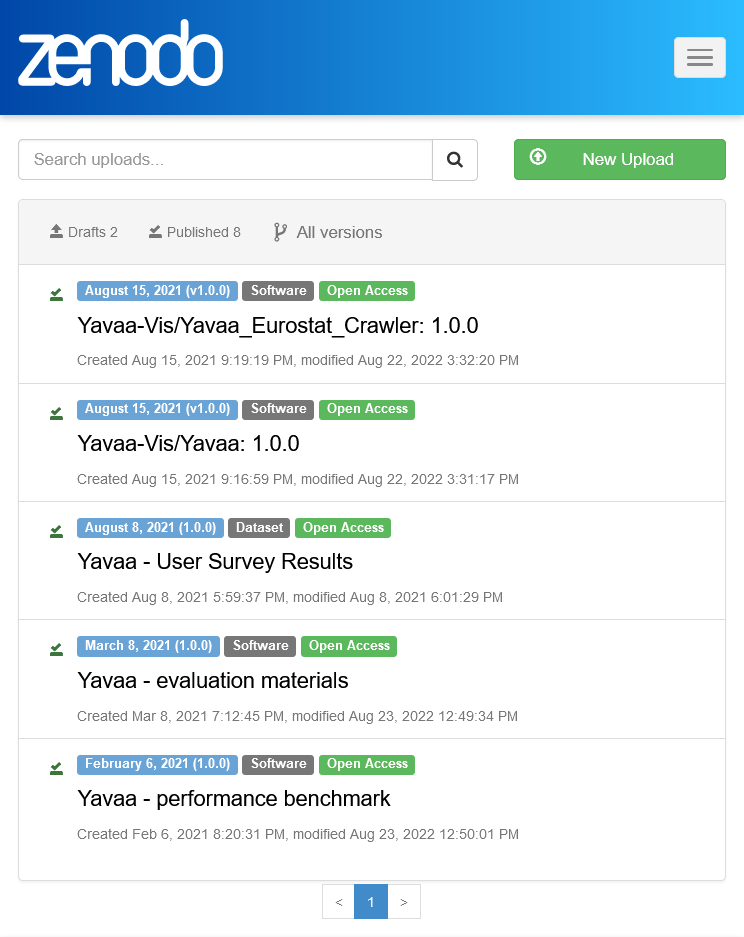
Eurostat Crawler 10.5281/zenodo.5204518
Evaluation Materials 10.5281/zenodo.4589337
Evaluation User Survey Results 10.5281/zenodo.5171103
Evaluation Performance Benchmark 10.5281/zenodo.4514808
Recap
Backup Slides
GFX-Sources
-
![]() https://de.wikibooks.org/wiki/Datei:Idea.svg
https://de.wikibooks.org/wiki/Datei:Idea.svg -
![]() http://www.flaticon.com/free-icon/search-file_60495
http://www.flaticon.com/free-icon/search-file_60495 -
![]() http://www.flaticon.com/free-icon/hammer-with-bricks_27917
http://www.flaticon.com/free-icon/hammer-with-bricks_27917 -
![]() http://www.flaticon.com/free-icon/settings-gears_60473
http://www.flaticon.com/free-icon/settings-gears_60473 -
![]() https://www.flaticon.com/free-icon/design-tool_553205
https://www.flaticon.com/free-icon/design-tool_553205 -
![]() https://commons.wikimedia.org/wiki/File:Eo_circle_purple_arrow-rotate.svg
https://commons.wikimedia.org/wiki/File:Eo_circle_purple_arrow-rotate.svg -
![]() https://freesvg.org/save-file-icon
https://freesvg.org/save-file-icon -
![]() https://www.flaticon.com/de/kostenloses-icon/layout_272415
https://www.flaticon.com/de/kostenloses-icon/layout_272415 - https://commons.wikimedia.org/wiki/File:New_user_icon-01.svg